
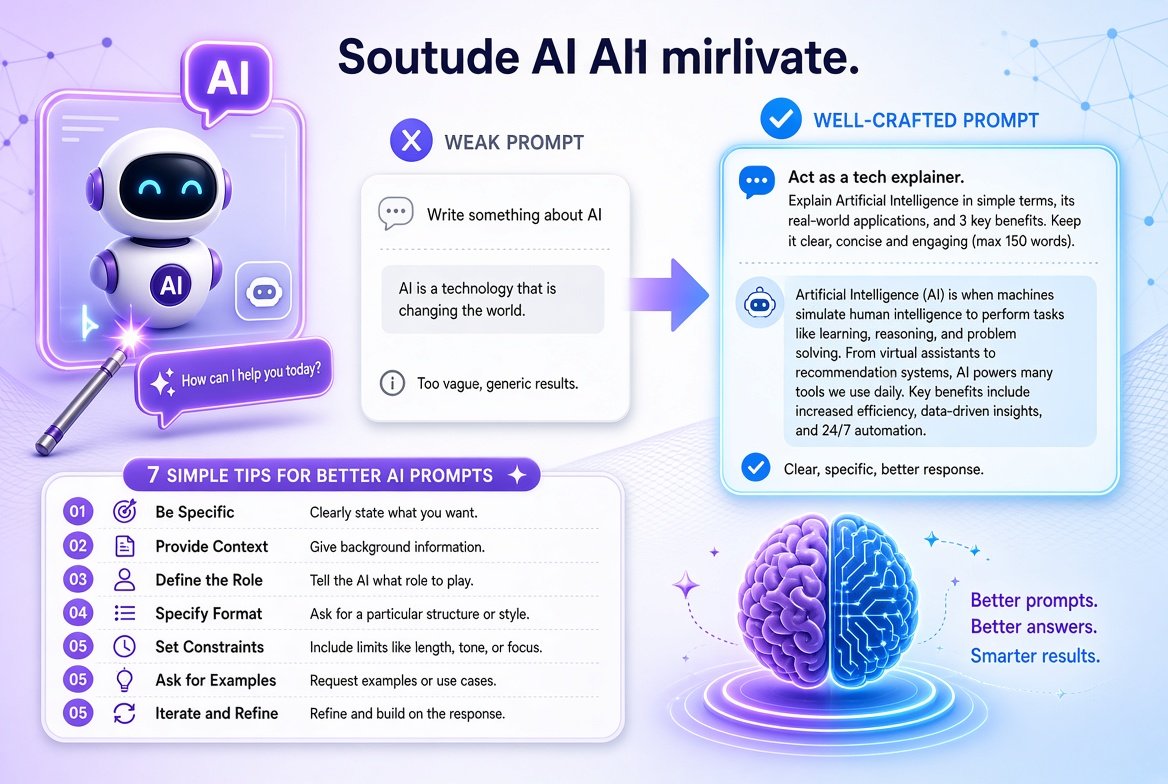
Have you ever asked an AI chatbot a question and got a vague, boring or wrong answer? In most cases the problem is not the AI. It is the prompt. A prompt is the instruction or question you type, and a small change in how you write it can change the answer a lot.
This guide gives you 7 simple tips for writing better AI prompts, with examples you can copy and change. These tips work with most AI chatbots.
What is an AI prompt?
A prompt is the text you give to an AI tool to tell it what you want. It can be a question, a task or a long set of instructions. A good prompt is clear, specific and gives the AI enough information to help you.
7 tips to write better AI prompts
1. Be specific about what you want
Vague prompts give vague answers. Say exactly what you need.
| Weak prompt | Better prompt |
|---|---|
| Write about SIP. | Explain what a SIP is in mutual funds in simple words for a beginner, in 150 words. |
| Help me with my email. | Write a polite email to my manager asking for leave on Friday. Keep it under 80 words. |
2. Give some background
The AI does not know your situation unless you tell it. Add facts that matter: who the answer is for, your goal, your level and any limits.
Example: “I am a college student with no knowledge of investing. I can save ₹2,000 a month. Explain my options in simple language.”
3. Tell the AI the role or audience
Asking the AI to take a role changes its tone and level of detail.
Example: “Act as a friendly tech teacher. Explain how Wi-Fi works to a 12-year-old.”
4. Say what format you want
Tell the AI how the answer should look: a list, a table, steps, a short paragraph or an email.
Example: “Give me 5 tips to save battery on Android as a numbered list, one line each.”
5. Break big tasks into steps
If a task is large, do it in parts. First ask for an outline, then ask for each section. You will get better results than asking for a full report in one go.
Example: First: “Give me an outline for a blog post on saving electricity at home.” Then: “Now write the first section in a friendly tone.”
6. Add examples of what you like
If you want a certain style, show a short sample. The AI can follow the pattern.
Example: “Write product descriptions in this style: ‘Light, soft and made for everyday wear.’ Now write one for a cotton shirt.”
7. Improve the answer with follow-up prompts
Your first prompt does not have to be perfect. Treat it like a conversation. Use follow-ups such as:
- “Make it shorter.”
- “Use simpler words.”
- “Add an example from daily life.”
- “Rewrite it in a more formal tone.”
- “Give me three different versions.”
A simple prompt formula you can reuse
When you are not sure how to start, fill in this template:
Task + Context + Role (optional) + Format + Limits
Example: “Write a short Instagram caption (task) for my small tea stall opening this Sunday (context). Make it friendly and fun (role/tone). Give me 3 options, one line each (format). Do not use more than 2 emojis (limits).”
Common prompt mistakes to avoid
- Too short or too vague: “Tell me about cars” can mean anything.
- Too many tasks in one prompt: Ask for one main thing at a time.
- No audience or goal: The AI cannot guess who the answer is for.
- Accepting the first answer: Always read it and ask for changes.
- Not checking facts: AI can sound confident and still be wrong.
Use AI safely
- Do not share private information. Avoid typing passwords, bank details, OTPs, Aadhaar or PAN numbers and other personal data into a chatbot.
- Check important facts. For health, money, law or news, verify the answer from an official or trusted source before you act on it.
- Use AI as a helper, not a replacement. Add your own ideas and edit the result, especially for school work, jobs and anything with your name on it.
- Follow your school or workplace rules about using AI tools.
Frequently asked questions
What makes a good AI prompt?
A good prompt is clear and specific. It states the task, gives background, mentions the format and sets limits such as length or tone.
Do longer prompts always work better?
Not always. A long prompt helps when the extra details are useful. A short prompt is fine for simple questions. Clear beats long.
Can I write prompts in Hindi or Hinglish?
Yes. Most AI chatbots understand Hindi and Hinglish, and you can ask for the answer in the language you prefer. If the answer is not clear, try asking again in simple English.
Why does the AI give me wrong answers?
AI tools can make mistakes or invent details. Ask it to explain its steps, check the facts from a trusted source and give it more context.
Do I need to learn special “prompt engineering” tricks?
No. For daily use, being clear and specific, giving context and asking follow-up questions is enough.
Final thoughts
Better prompts save time and give you answers you can actually use. Be specific, add context, choose a format, and keep improving the result with follow-ups. If you want to try more AI tools, you can also read about learning and using AI with Redeepseek and AI writing tools beyond Grammarly. For more tech and AI guides, visit our Tech section.